Circuit Overview
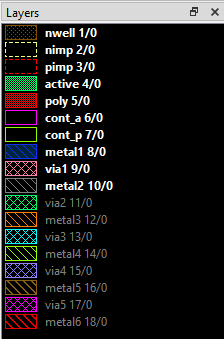
This page provides a detailed analysis and layout implementation of the current mirror circuit from Chapter 3, Problem 7 of "Analog Integrated Circuit Design" by Carusone, Johns, and Martin. This exercise is to refresh my understanding of fundamental analog circuit design principles, and solving problems using the equations associated with MOSFET operation.
Problem Statement
Chapter 3, Problem 7: Using the three-transistor circuit shown in Figure 1, which is to be used as a current source. Using the following parameters, determine the size of the output transistor, Q3, such that the output current is 200µA.
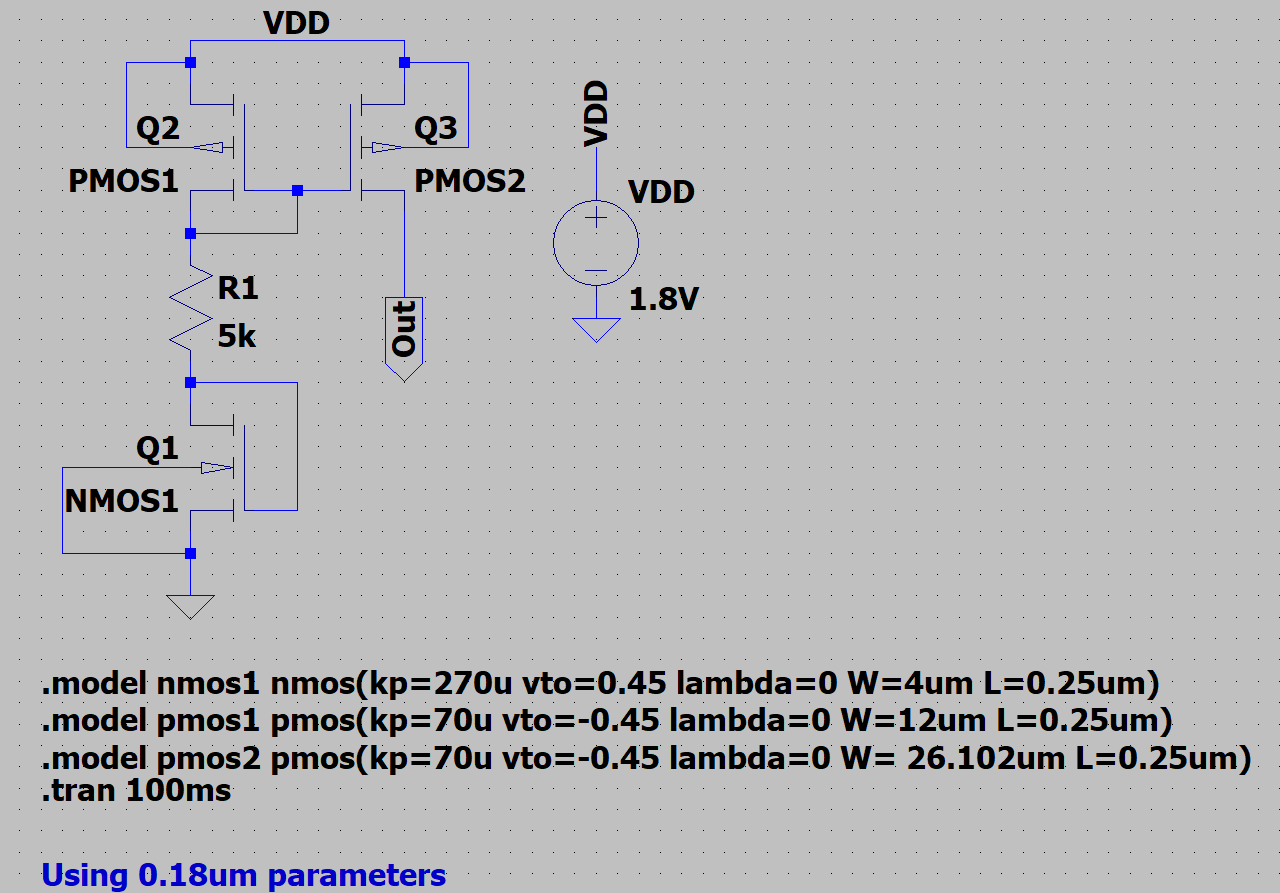
Parameters
- VDD: 1.8V
- µpCox: 70 µA/V²
- µnCox: 270 µA/V²
- Vth: ±0.45V
- λ = 0
- Q1 (W/L): 4µm / 0.25µm
- Q2 (W/L): 12µm / 0.25µm
- Resistor: 5 kΩ
Circuit Analysis
Kirchhoff's Voltage Law (KVL)
The design process begins with solving for the reference current using KVL around the input loop. Some important definitions and equations are used in the analysis.
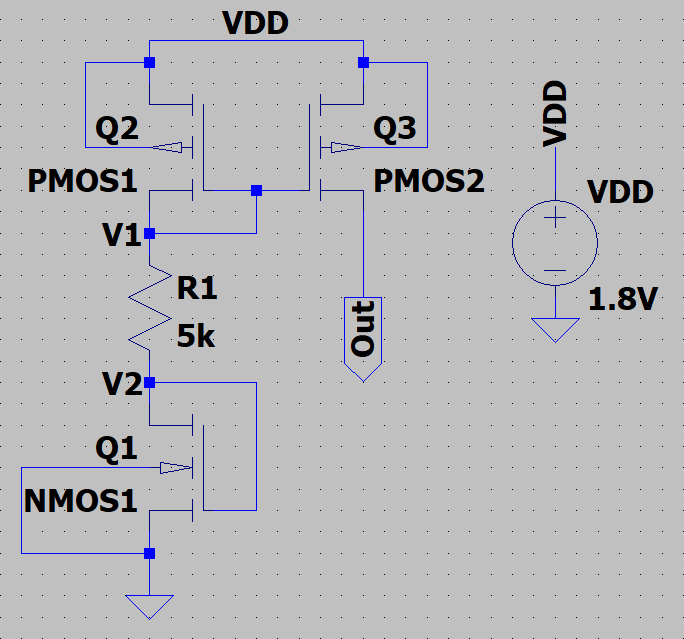
For MOSFETs operating in saturation, since Q1 and Q2 have their gates connected in a diode configuration and λ=0, the drain current is calculated as:
For the KVL analysis of the loop we need to rearrange this to solve for VGS:
Due to the diode connection:
The voltage across the resistor is:
Finally, KVL is applied around the input loop:
Substituting eq(1) into eq(2) and eq(3), and subbing eq(4) into eq(5) we can then rearrange eq(5) to solve for ID1:
Now that we have eq(6) we can solve for ID1 by rearranging it into a quadratic form and using the quadratic formula, where:
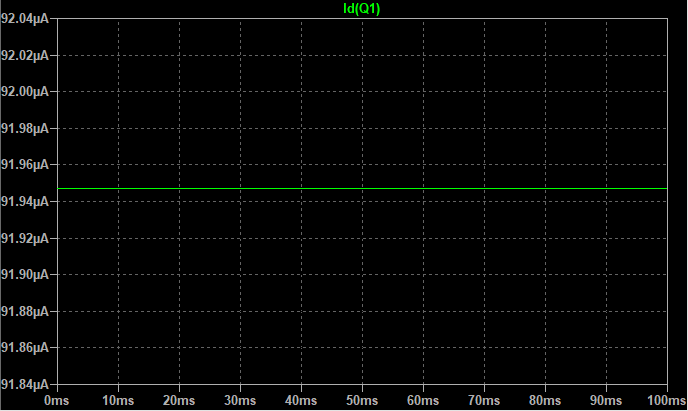
This results in a reference current of ID1 = 91.95 µA. Which was confirmed in an LTSpice simulation shown in figure 3.
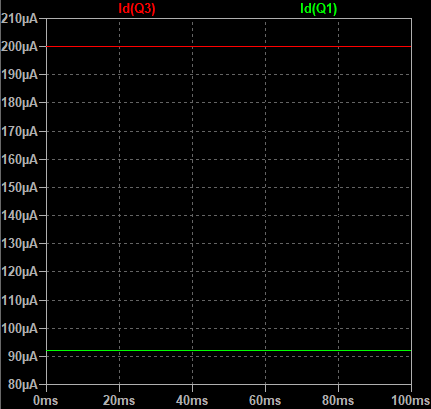
With the reference current known, we can now size Q3 to provide the desired output current of 200 µA. Using the drain current equation for saturation and rearranging to solve for W/L: 26.102µm/0.25µm. Which was also verified in LTSpice as shown in figure 4.
KLayout Implementation
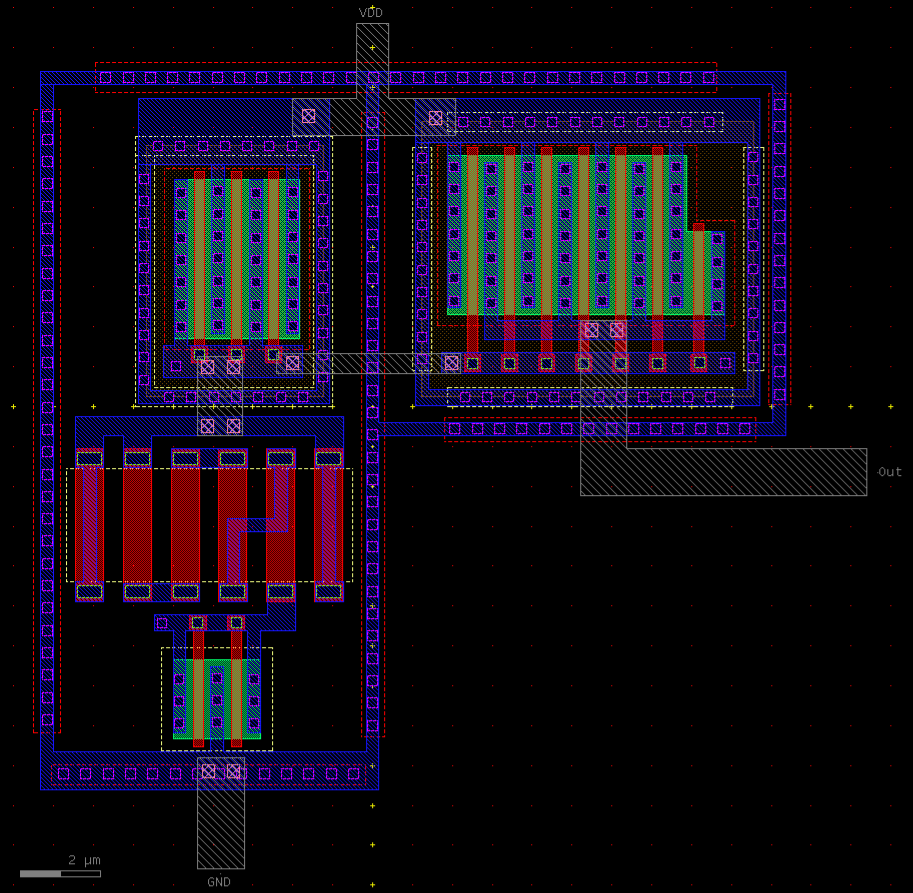
The first step in the layout process was to decide on a floorplan for the layout. The devices were arranged for the best possible matching. The PMOS transistors are placed together at the top of the layout to create easy access to the power supply, as well as to make sure the shared gate connection was short and easy to wire. The NMOS transistor was placed at the bottom of the layout to allow for easy access to ground. The resistor section was placed in between transistors Q1 and Q2 to minimize routing complexity. As this is just a current source I elected to leave the connection points, VDD, GND, and Out as metal2 layers instead of adding pads for them. The full layout is shown in figure 5.
PMOS Layout
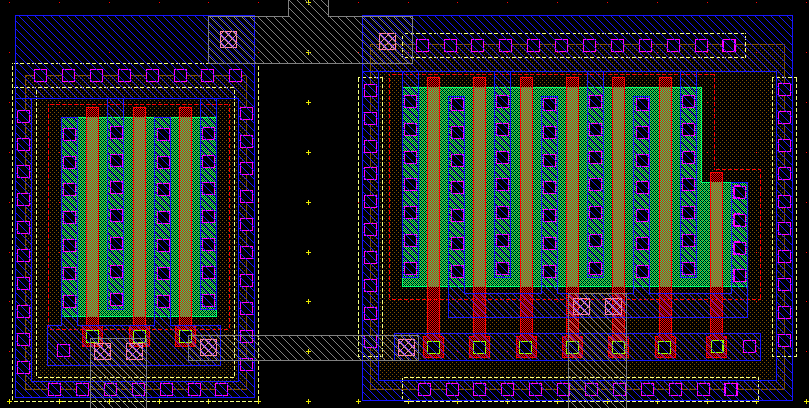
This was the first section of the layout I decided to tackle, as I found working from the top of the circuit downwards to be the most intuitive. To make the layout more compact and to improve matching of the transistors. I oriented both PMOS devices in the vertical direction. Then placed them closely so that they could share a common power source. Using the same width for the active region also made it easier to line up the gates for a common connection.
Reference PMOS
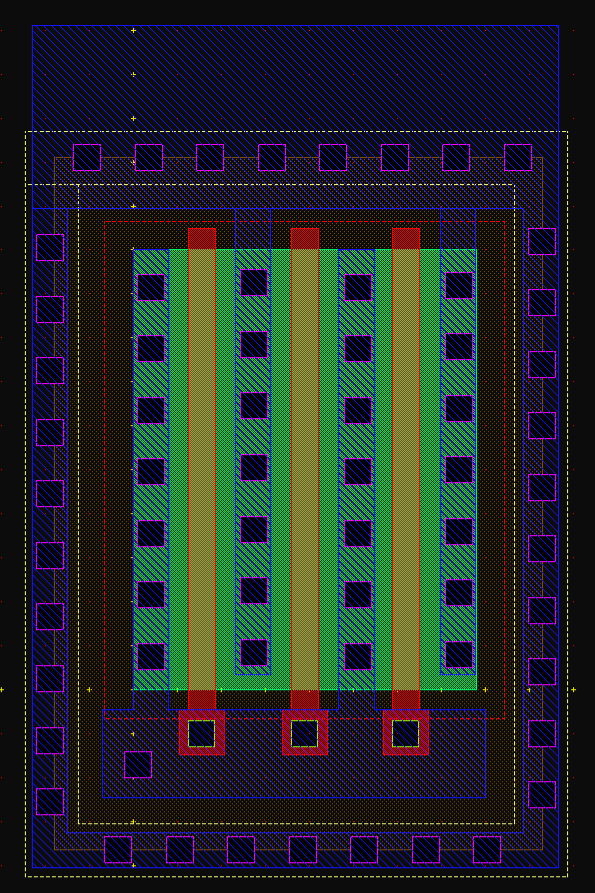
This is the first device I worked on for this layout. I started with drawing out a rectangular active region and then adding the p+ diffusion region. It is important that I assumed that in this process the polysilicon layer would be created before the p+ implantation step, and therefore could be used as a natural mask, separating the diffusion regions of both the gate and the source. After defining the active and implantation regions, I moved on to designing the gate poly. I designed the gates of each finger to be separated to reduce the antenna effect during fabrication. To reduce the size of the device I also designed the gate to be connected directly to the metal1 layer of the drain of Q2. To prevent any issues with the gate due to the antenna effect I added a Net Area Check (NAC) diode to the drain connection. Finally, when I worked on the source, I made sure to add well contacts around the N-well region to help with isolation. Even though this is not necessary for a simple current mirror, I feel that it is a good practice to get into as I pursue an analog design career. The full layout of PMOS1 (Q2) is shown in figure 8. There were a few things I would change about this layout if I were to do it again, the biggest is to make sure that all dimensions are exact multiples of the grid size. As I found it hard to line up some of the layers due to snapping issues. The most significant cause of these issues was the gate length. So in future projects, I will make sure to adjust the gate length given in the practice problem to a multiple of the grid size. As it makes the layout process much easier. I noticed this problem while working on the layout of PMOS2. So there I began making these kinds of adjustments to make the layout process smoother, and actually producible.
Output PMOS
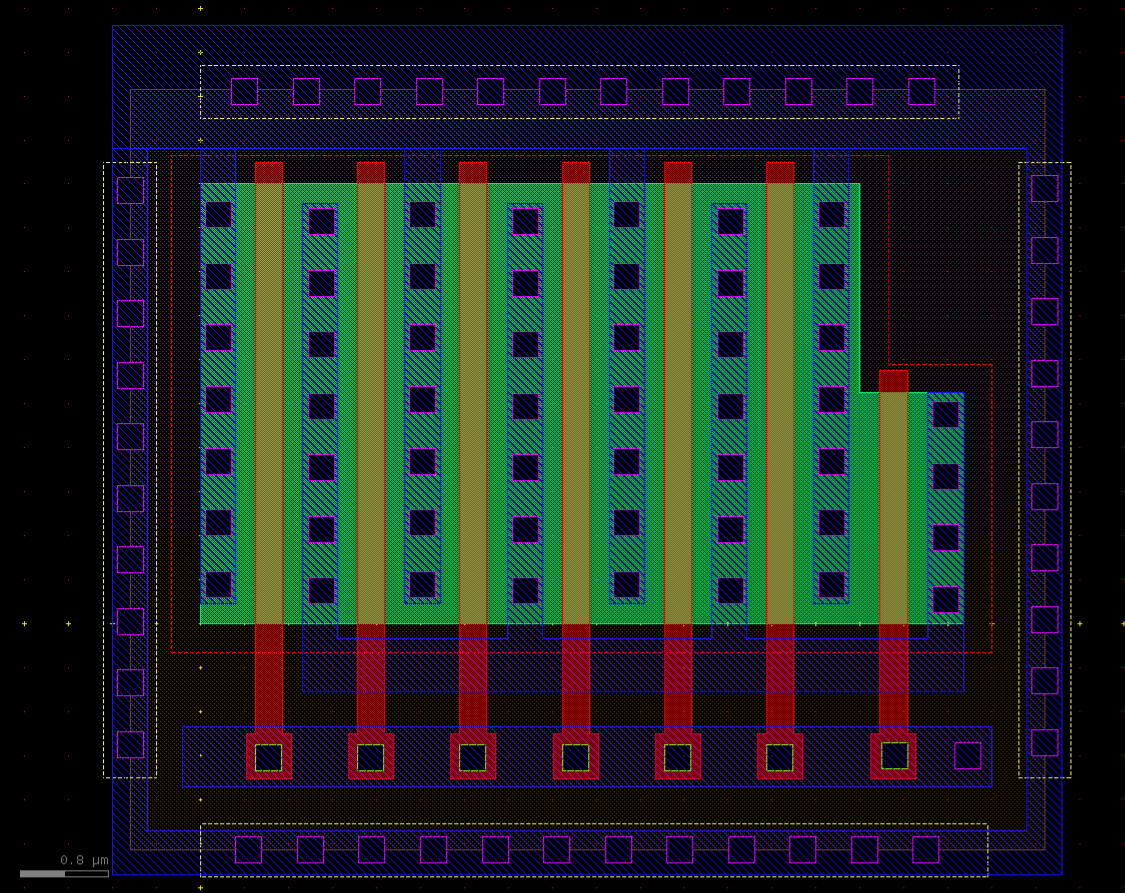
For the layout of PMOS2 (Q3) I followed a similar process to the reference PMOS. However, due to the calculated width of 26.102µm, I couldn't easily make the width a multiple of 4µm like I did for PMOS1. So instead, I made 6 fingers that had a width of 4µm and then added a 7th finger with a width of 2.1µm. This maintains the effective gate area of the transistor while reducing the size of the layout. The only other change I made was to add a strip of metal1 to connect all of the gates. This made it easier to route the gate connection to PMOS1. As well as it gave me a place to add a NAC diode. The full layout of PMOS2 (Q3) is shown in figure 9. Again, I made sure to add well contacts around the N-well region to help with isolation. Another thing I did in this design was to make sure that the source of PMOS2 and PMOS1 were aligned, so that the wiring of the devices would be easier. The drain of PMOS2 can simply be connected to a metal2 layer and be routed out of the layout.
Design Notes
While working on these designs one major consideration I have yet to mention is the ability of the materials to handle current. One of the major sources I have been using for this project is the book "IC Mask Design" by Christopher and Judy Saint. In this book, they give a lot of useful design rules and "rules of thumb" for designing circuits. (As I look for the current rule of thumb, I realize I should remake the resistors. As in the book they state that for resistors, the rule of thumb is the minimum width is 5µm, and minimum length is 10µm. So in the future I will scale this for the size of the process I am using, The book is 20+ years old after all.) The rule of thumb for current density is; "A 1µm wide wire can handle 1mA of current" Using this for a 200µA current, and a minimum width of 0.32µm for metal1 means that the minimum width of the metal1 is more than enough to handle the currents in this circuit.
Resistor Layout
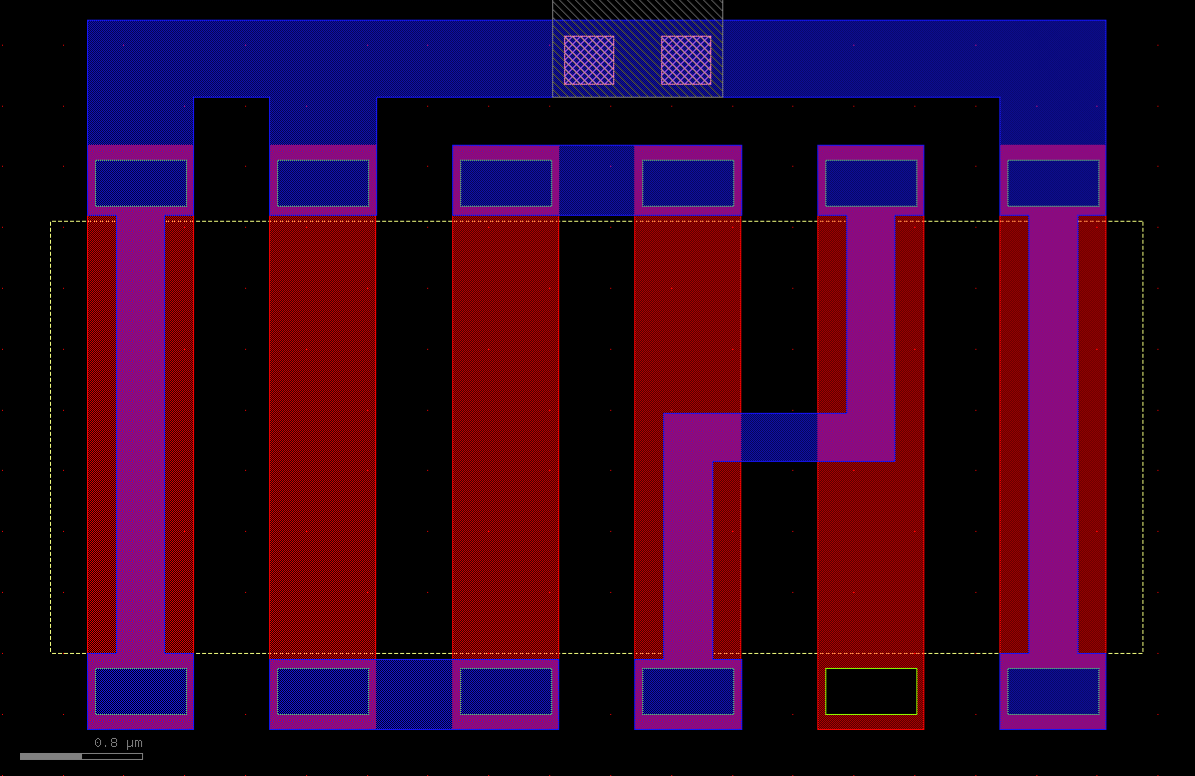
The resistor layout should have been the most straightforward part of the layout, but it involved the most guess work of the design. As I could not find any specific information about the sheet resistance of the poly layer. So I had to make some assumptions. Using Christopher and Judy Saint's other book "IC Layout Basics" I guessed that the sheet resistance of a doped polysilicon layer would be around 250 Ω/sq. Using this value and the knowledge that I wanted to break the 5kΩ resistor into multiple segments to reduce the total space of the resistor. using the 2nd equation for resistance taken from page 171 of the book IC Layout Basics, I calculated the total length of each segment to be 2.88µm for a resistor width of 0.7µm. This resulted in a total of 1.25kΩ per segment. Using 4 segments connected in series would give me the desired 5kΩ resistance. I added 2 dummy segments on each side of the resistor segments to help with the matching of the resistor segments as the outer segments of a layer tend to etch slightly differently than the inner segments. The full layout of the resistor section is shown in figure 10. The segment is not connected on the bottom side is where the drain of Q1 connects to the resistor. I found it easier to just leave that part open at this stage of the layout, and then design the connection when I worked on the NMOS layout.
NMOS Layout
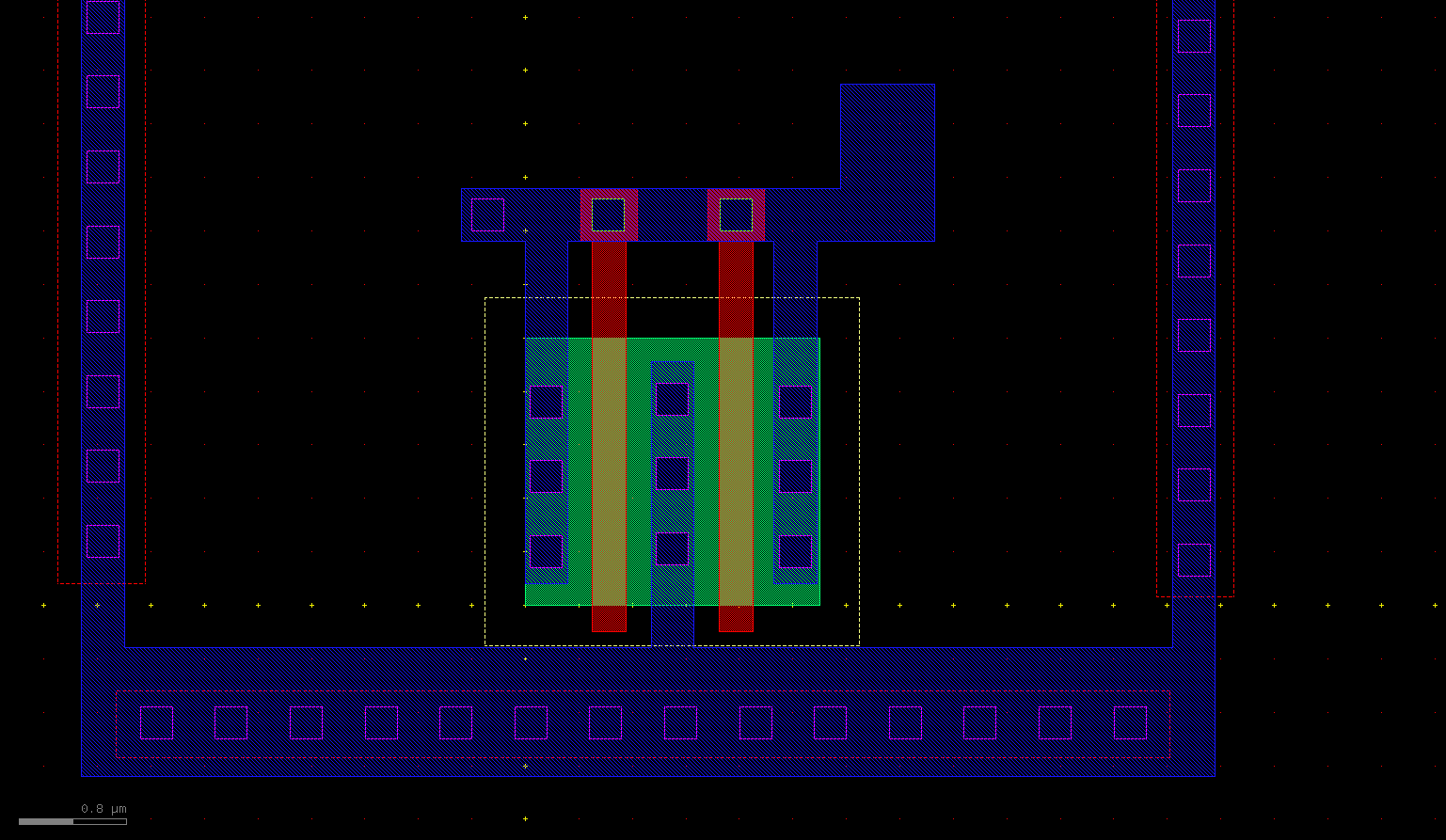
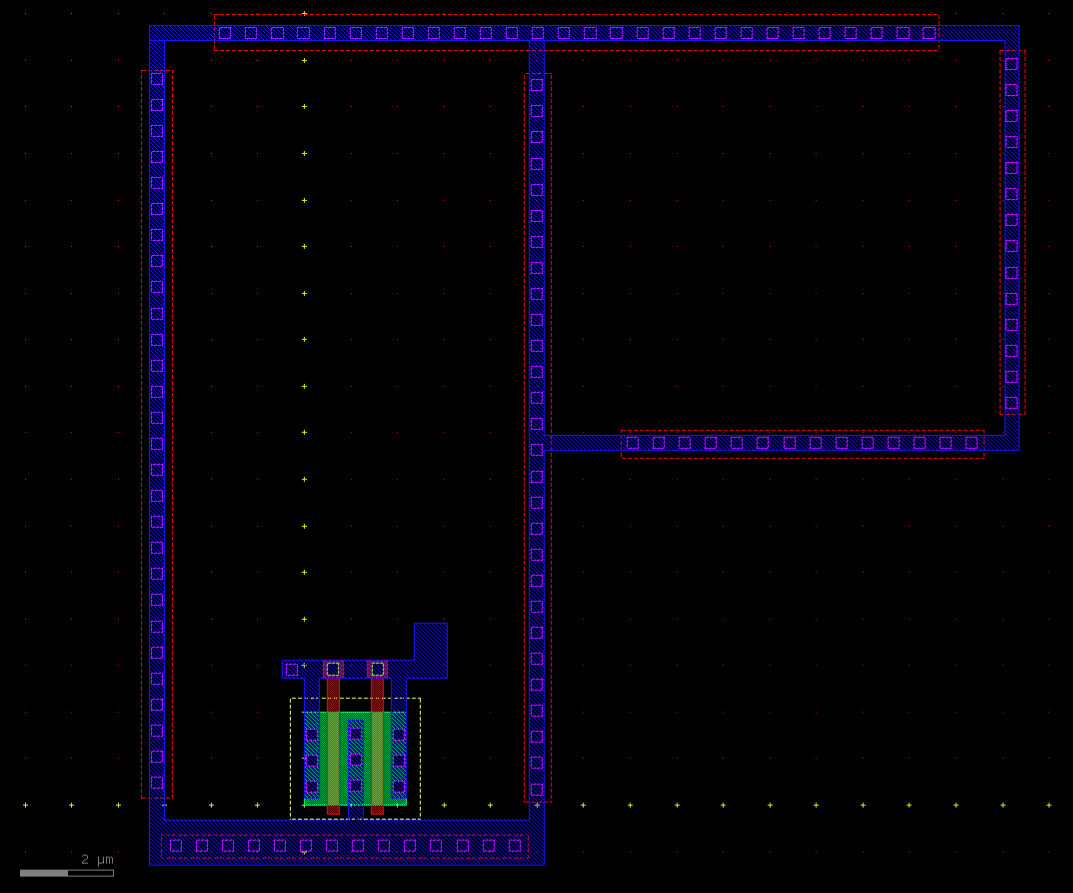
This device didn't need much design effort as it is the smallest device in the layout. But I did elect to use multiple fingers for this device in the attempt to improve matching by keeping the device in a vertical orientation like the PMOS devices. Instead of orienting it horizontally, which would be better for connecting the current to ground. But due to the small amount of current in the circuit, I figured that prioritizing matching was more important than current density. But I did use 2 fingers to reduce the overall height of the circuit. The layout of the NMOS device is shown in figure 11. Finally to really help with isolating the circuit from substrate noise I added substrate ties all around the circuit and connected them to the ground of the NMOS device. Shown in figure 12.
Final Connections
Finally, to connect everything together, I used metal2 layers to route the power supplies and the output, as well as any connections required between devices. To see the complete layout please refer back to figure 5.
Design Rule Verification
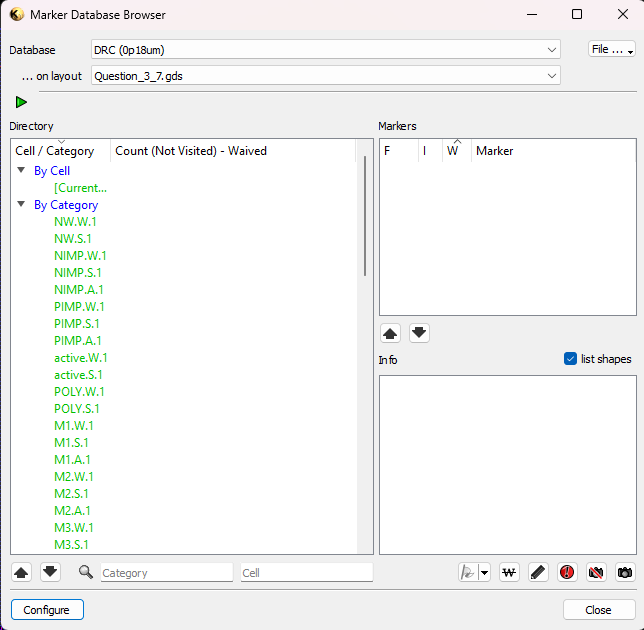
This layout gave me the chance to both practice designing a layout while interacting with a DRC tool and to debug my DRC script. After debugging my DRC script, my design has passed the rule check, shown in figure 13.
2026/01/05